The fact that Omnis lacks support for Postgresql SSL out-of-the-box is a concern. A modern software should always use SSL. So you have to add this manually by yourself. And the Omnis documentation is not clear about exact how to do this. Some steps contains faulty or outdated information.
But thanks to Omnis Support I finally got this to work.
1. Download source for new SSL files
The source for files that have SSL support is here (Postgresql 15.x for Mac)
2. Open "Display Package Contents"
On Mac the package content is hidden. So you have to enter this hidden area. Right click on Omnis 11 Runtime. Click “Display Package Contents“. Make sure the account you're using has both Read and Write permissions on the folder called “Contents”.

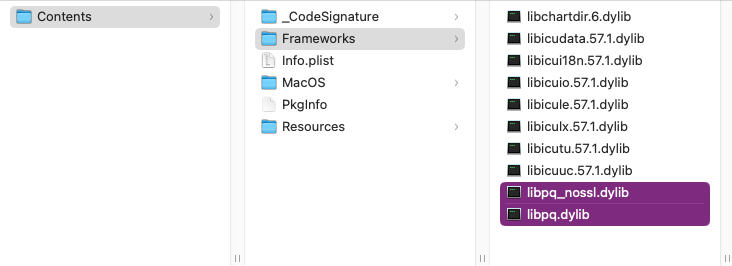
3. Delete old files in the Frameworks folder
In /Contents/Frameworks folder delete the following files:
- libpq.dylib
- libpq_nossl.dylib
4. Move new files into Omnis Content/Framework
Using the “Binaries from installer Version 15.x”, copy the following libraries into the Frameworks folder of your Omnis installation.
- libpq.5.15.dylib
- libpq.dylib (symlink)
New files from the source "Binaries from installer Version"

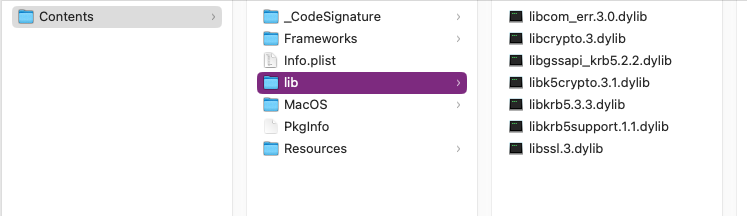
5. Create a new folder "lib" and move files into this
Create the folder: /Contents/lib and copy the following files from the source into the new "lib" folder:
- libcom_err.3.0.dylib
- libcrypto.3.dylib
- libgssapi_krb5.2.2.dylib
- libk5crypto.3.1.dylib
- libkrb5.3.3.dylib
- libkrb5support.1.1.dylib
- libssl.3.dylib